Hireology’s partnership with key job boards enables jobs to be sponsored from the Hireology platform to increase visibility of essential roles.
In This Article We Will Cover:
Viewing Active Sponsorship Activity
To view a particular job’s current active sponsorships, click on Sponsorships > View Sponsorship Activity tab. You can view budget and applicant yield data for any currently active campaigns from Indeed or any of our other sponsored job options.
If you want to order an additional sponsorship for this job, you can click on Order Additional Sponsorships.
Insights Sourcing Activity Report
Sourcing Performance
Toggle to the "Sourcing Performance" tab to view and filter your applicant pipelines.
Review the quantity and quality of applicants by source, identify which applicant sources are converting to hires, applicant to candidate conversion rates, and Hire source by job role.
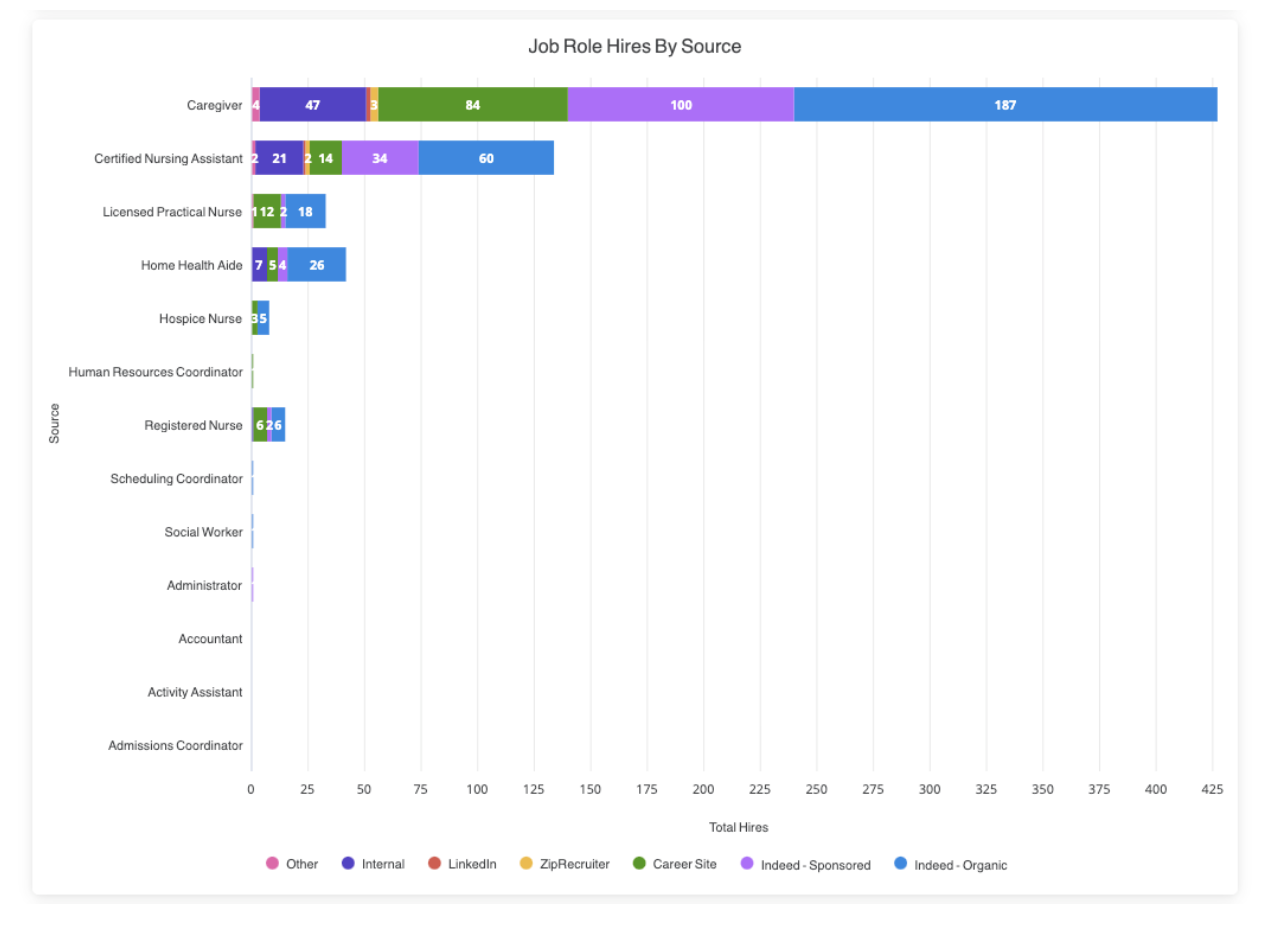
Additionally, track success metrics related to referral campaigns, and data around sponsored roles, if applicable.
Click into any of your data tiles to drill down into granular data points.
Comments
0 comments
Please sign in to leave a comment.